Convergence Media Art Director & Educator
Sang Jun Kim Author
A Practical Guide Packed
with Field Know-how
FROM LOGIC TO ART
Over the past decade, passing through top-tier post-production and media groups in Korea, I have accumulated intensive practical experience at the forefront of the Korean CG and VFX industry. By deeply mastering the high-end software used as a global standard, I have laid the technical foundation to perfectly manifest any imagination in my head into reality on the screen.
However, I realized in the field that advanced technical achievement does not necessarily guarantee the perfection of the work. To leap from a simple technical operator to a creative director equipped with planning ability and artistic philosophy, I have repeatedly conducted academic research on the essence of visual art and media convergence.
This exploration led my CG skills to a new spatial canvas called 'Media Art'. Houdini's procedural algorithms and massive data control power go beyond simple movie effects and become the core driving force of media art that realizes generative visuals. From the media facade 'Creation of Heaven and Earth' presented on the front of the Sejong Center for the Performing Arts, to 'Cinema in Jazz' which attempted interaction between jazz and video, I have proven the contact point between technology and art through convergence art attempts that cross genres.
Currently, at Kyung Hee University and Chungkang College of Cultural Industries, I am passionately imparting the vivid know-how of the field to the younger generation, nurturing next-generation media creators with logical thinking for problem-solving and a convergent perspective.
Learning 3D graphics, especially Houdini, is not just a process of memorizing the location of buttons in a tool. It is the process of becoming a 'Technical Director' who mathematically and procedurally controls the form and movement of objects in the language of computers. What is truly required in the field is a robust design ability to flexibly cope with variables.
The vast world of Houdini is divided into two processes: <3D FX I: Procedural Modeling>, which logically designs the framework of data, and <3D FX II: Dynamics>, which breathes physical vitality into it.
As an introductory step into the world of dynamics, this volume (Vol. 2.1) shifts its focus away from dazzling visual effects and toward the foundational logic of simulation. It addresses critical questions such as: 'Why is this solver necessary?' and 'How do systems dynamically adapt to changing physical properties?'
Through this book, I hope you will grow into a true professional who can actively control the system under any client's demands.
Chapter 01. Rigid Body Dynamics (RBD) Basics and Bullet Solver
A scene where a building explodes and thousands or tens of thousands of fragments pour down. In the past, to produce such a scene, every polygon collision had to be calculated one by one, requiring supercomputers to compute for days. It was unmanageably heavy. However, the situation completely changed with the introduction of the Bullet Physics Engine. Modern massive destruction FX are 100% based on this Bullet Solver. In this chapter, we will perfectly establish the basics of RBD through a bowling pin knockdown practice.
Developed by Erwin Coumans, the Bullet Physics Library is a world-class open-source physics engine widely used in AAA games like GTA and Red Dead Redemption, as well as Disney and Marvel movies.
Because it is overwhelmingly lighter and faster than the old RBD Solver Houdini developed in the past, the Bullet engine handles practically 100% of Rigid Body calculations in the latest versions of Houdini.
SOP (Surface Operator): The outside space that deals with points, lines, and faces to create shapes.
DOP
(Dynamics Operator): The virtual simulation space that calculates physical laws like gravity, wind, and collision on created objects.
Before moving to dynamics (DOP), we need to set up the objects outside (SOP) first. It is cumbersome to model each bowling pin, so let's set them up using basic shapes.
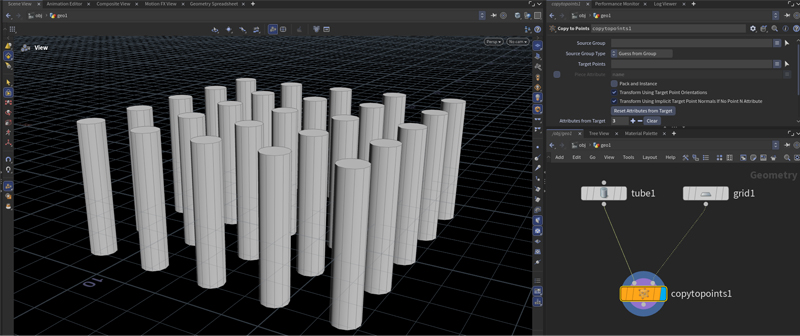
Tube. Change Height to 5 in parameters and check End Caps to close it.Grid. Set Rows and Columns to 5 each in parameters.Copy to Points node. Connect Tube to the left input and Grid to the right input.
Array of 25 pins created using Tube and Grid
If you combine bowling pins and the ball into a single Merge at the SOP stage, it becomes very difficult to give them different speeds or weights inside DOP.
It is standard practice to keep groups with different movements or properties completely separated in the node tree (e.g., pins standing still vs. a ball flying at high speed).
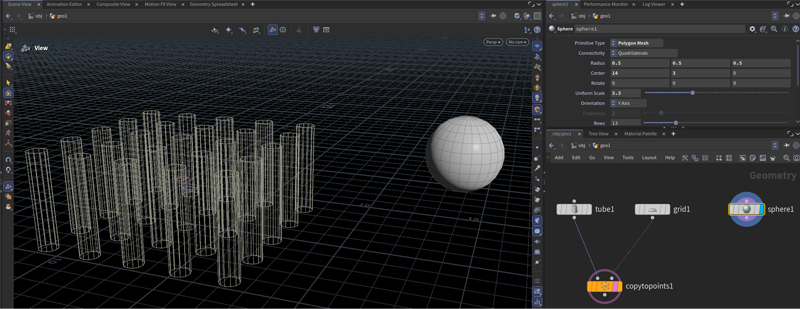
Sphere node and change Primitive Type to Polygon Mesh.
Translating X, Y coordinates of the bowling ball (Sphere) waiting for strike
The first absolute rule for running Bullet simulations lightly is that 'all objects must be packed into Point units'. Skipping this can crash the system as it tries to calculate countless polygons.
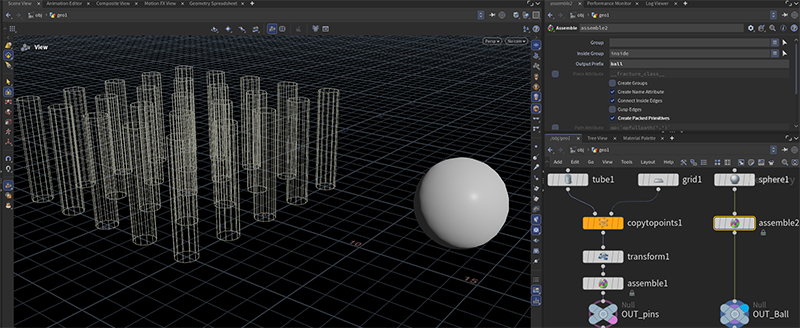
1. Aligning Center Pivot: Attach a Transform node below Copy to Points. Since pins are digging into the floor (Y=0), raise Translate Y to 2.5 to make them stand fully above the floor.
2. Packing Pins: Connect an Assemble node below the Transform node.
Countless fragments collide inside the dynamics space. For Houdini's solver to accurately distinguish "whether the piece that just hit is pin 15 or pin 23", you must attach nametags.
Setting the Output Prefix in the Assemble node attaches unique computer-readable nametags in the format of pin_0, pin_1.
1. Packing the ball: Attach an Assemble node below the Sphere node as well, check the options, and type ball in the Output Prefix field.
2. Organizing with Null nodes: Attach Null nodes at the end of both groups. Change their names to OUT_pins and OUT_ball to make them easy to fetch in dynamics.
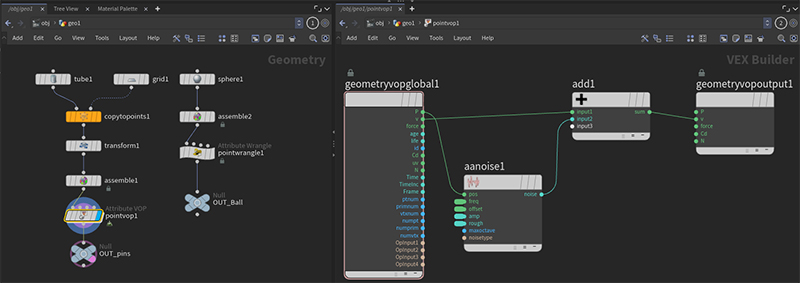
Final SOP tree concluded with respective Null nodes (OUT_pins, OUT_ball)
Once geometry packing is complete, it is finally time to construct the DOP (Dynamics Operator) network, the virtual space where physical calculations will be performed.
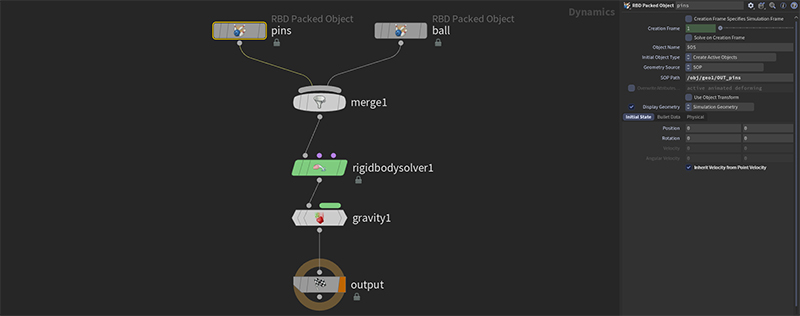
DOP Network and enter inside it.Rigid Body Solver node that will act as the brain of the physics engine. (In parameters, Solver Engine is set to 'Bullet' by default.)Gravity Force node below the solver to apply gravity.They do not alter data but act as milestones indicating "this is the completed output point." They prevent errors when finding paths from other networks.
When bringing packed objects into DOP, you must use the RBD Packed Object node, not a regular Object node.
RBD Packed Object nodes and rename them to pins and ball respectively.OUT_pins Null node created outside and click Accept.OUT_ball path for the ball node in the same way.Merge node to combine pins and ball together.Rigid Body Solver.
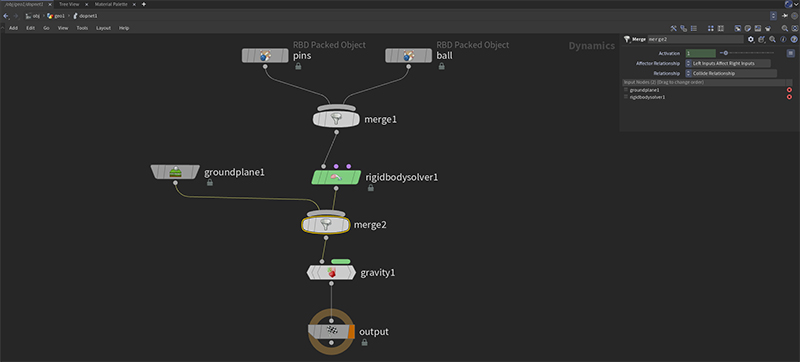
Basic DOP tree flowing from Object -> Merge -> Solver -> Gravity
To simulate multiple objects simultaneously in the DOP space, you must combine them into one using a Merge node.
And this grouped bundle of data must always go into the first input terminal (Input 1: Objects) of the Solver to be calculated properly.
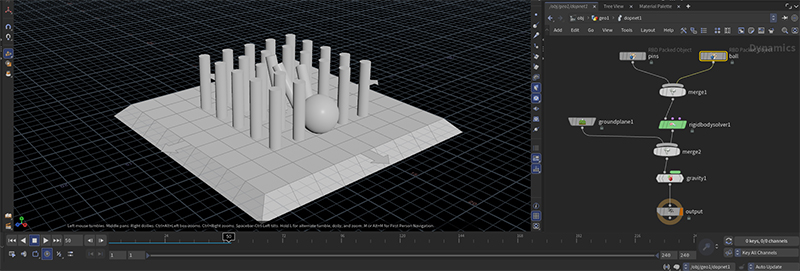
If you press the Play button at the bottom of the timeline now, the pins and ball will fall endlessly in mid-air due to gravity. We need to create an infinite floor for physical interactions to occur.
Ground Plane node. (A physical floor that is not rendered).Merge node (merge2).Gravity Force.
The Ground Plane MUST be connected to the leftmost pin of the Merge node!
If objects remain frozen in the air or show no changes even after modifying settings, the simulation cache (temporary calculation results) is tangled.
Click the [Reset Simulation] button in the DOP Network node parameter window, press Ctrl + ↑ on the timeline to return to frame 1, and play again. The blue bar at the bottom will recalculate and work normally.
The Merge node in DOP has a principle where 'the left input affects the right input'.
Since the floor must physically affect objects to prevent them from falling, you must order the Merge node input pins so that the far left is the Ground Plane and the right is the Solver connection for proper collision.
* Select the nodes and press Shift + R to align and untangle crossed wires.
Now the ball needs to move and strike the pins. It will move if you directly assign Velocity values in the Initial State tab of the ball node parameters inside DOP. However, in practice, this is rarely how it's done.
Step A: Coding Velocity (v) Outside
Point Wrangle between the ball's Assemble node and the OUT_ball Null node.Step B: Inheriting Velocity in DOP
ball object node and open the Initial State tab.
Ball flying at speed 10 to strike the pins (Playback Screen)
🤔 Why set velocity outside (SOP)?
If you assign Velocity inside DOP, that force is forcibly applied every single frame, resulting in unrealistic outcomes.
For a realistic simulation where an 'initial throwing speed' is set and gradually stops due to air resistance, it is standard practice to create one-time velocity data outside and bring it into DOP.
Speed is a scalar value having only magnitude without direction. (e.g., 5km/h)
On the other hand, Velocity (@v) used in Houdini is a vector value containing both direction and magnitude, dictating 'how much to go in which direction'. Thus, you can input values for three axes: x, y, and z.
What if we want exploded fragments to scatter in all directions like fireworks instead of one direction? We just give random Velocity to each pin. In this case, using node-based VOP is more intuitive than coding (Wrangle).
Point VOP below the Assemble node of the pins group, and enter it.Anti-Aliased Noise node and an Add node.Add node, and output the final result to the v pin of the Global node.
VOP network generating noise based on P (position) and adding it to V (velocity)
If you click the noise node and increase the Amplitude value in the parameter window, you can see the explosive force (velocity) becomes much stronger, sending fragments flying far in all directions.
What if the ball hits a pin, but the pin is so heavy that the ball bounces off? To achieve a realistic simulation, you must adjust the density (weight), friction, and bounce of objects just like in the real world. Adjust these in the Physical tab of the RBD Packed Object node inside DOP.
| Physical Attribute | Role and Practice Application |
|---|---|
| Density | Weight. If you significantly increase the ball's value from 1000 to 10000, it will sweep heavily through the pins. |
| Rotational Stiffness | Resistance to rotational forces. The lower the value, the easier the object spins mid-air like a top. |
| Bounce | Elasticity. If you increase the Bounce of the Ground, ball, and pins all to 1, fragments will bounce around dynamically. |
| Friction | Friction. Lower this value to make surfaces slippery like a billiard table or ice rink. |
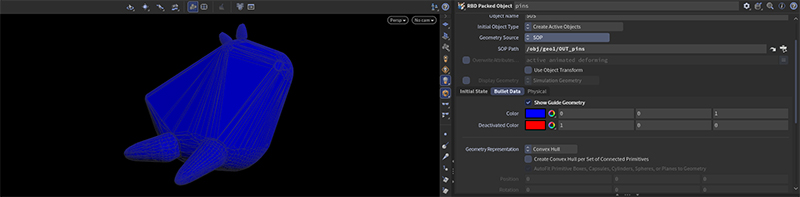
It refers to the simplified shape you get if you were to wrap a complex 3D model (e.g., a horned dragon) tightly in plastic wrap. Because it ignores concave parts and only connects convex outlines, collision calculation volume decreases exponentially.
The secret to the Bullet engine calculating tens of thousands of fragments in near real-time is that it doesn't perform collision calculations on the exact complex modeled shapes. It wraps objects in a simplified transparent wrap (Convex Hull), making calculations extremely lightweight.
The blue guide lines (Convex Hull) are the optimized areas responsible for actual collisions.
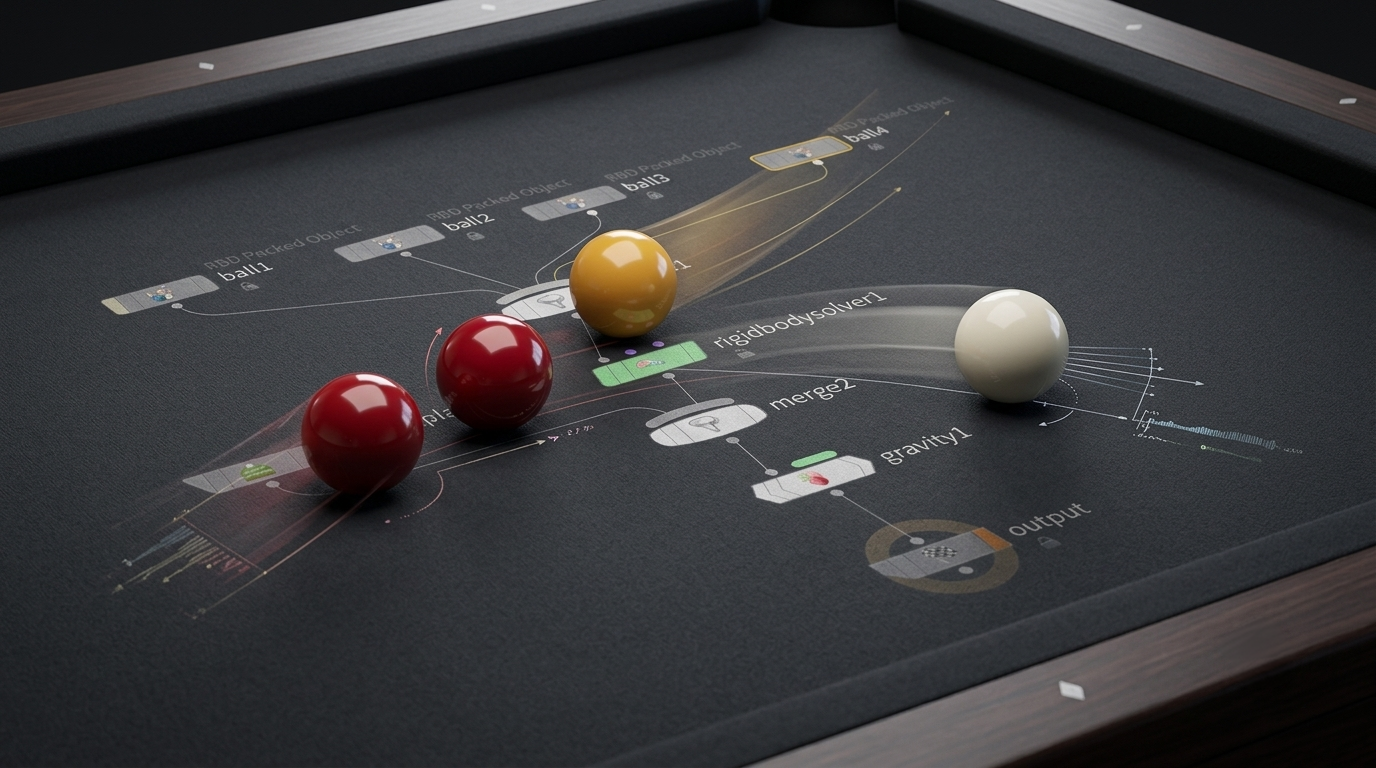
Create a Carom Billiards (4-Ball) simulation utilizing all the principles of RBD and Bullet Solver learned today. Through this assignment, hone your senses in deftly handling physical attributes like Density, Friction, and Bounce.
RBD Packed Object to use as the table base. At this time, since the base must not move, you must change the Initial Object Type to Create Static Objects.
Point Wrangle to give Velocity only to the 'cue ball (white ball)' and finely tune the angle and physical values (Bounce, Friction) to hit a 3-cushion shot.
All copyrights and intellectual property rights of this textbook belong to Transmediart Edu and the author (Sang Jun Kim). This document is licensed solely for the individual study of the original purchaser.
Unauthorized copying, distribution, re-sharing, or commercial transfer via online communities, messaging apps, social media, or file-sharing sites constitutes a blatant violation of copyright law. In the event of unauthorized leaks, strict legal actions (civil and criminal liabilities) will be taken without exception.
The web address and access password linked to this textbook are for the purchaser's exclusive use. Outdated files or credentials shared with third parties may be blocked when passwords are updated periodically according to course progression.